Demo Request Page Audit: What Buyers Need Before Booking
Audit a SaaS demo request page for meeting expectations, qualification questions, calendar clarity, accessible forms, and a useful next step.
A visitor clicks 'Book a demo' and reaches a form asking for their work email, phone number, company size, and budget. The page says almost nothing about the meeting. They are being asked to disclose information before knowing what they will receive.
A demo request page sells a small commitment: time, contact details, and a conversation with someone they do not yet know. Its job is to make that commitment understandable and worthwhile.
This audit covers meeting expectations, relevant proof, and a usable request flow. It separates page problems from attendance and sales problems that require your own operational data.
1. Describe the meeting buyers are actually requesting
'See the platform in action' does not tell a buyer whether they will receive a product walkthrough, a qualification call, or a tailored technical discussion. Those are different commitments. Name the real format and explain what the visitor should expect to learn.
Include the duration your team can reliably honor, the host’s role, and the main topics. If discovery happens before a product demonstration, say so before asking for a time slot.
Do not promise customization that your process cannot deliver. If every session follows the same introduction, describe it honestly. If a tailored example requires advance information, identify that information and explain how it will be used. The page and the person hosting the meeting should make the same promise.
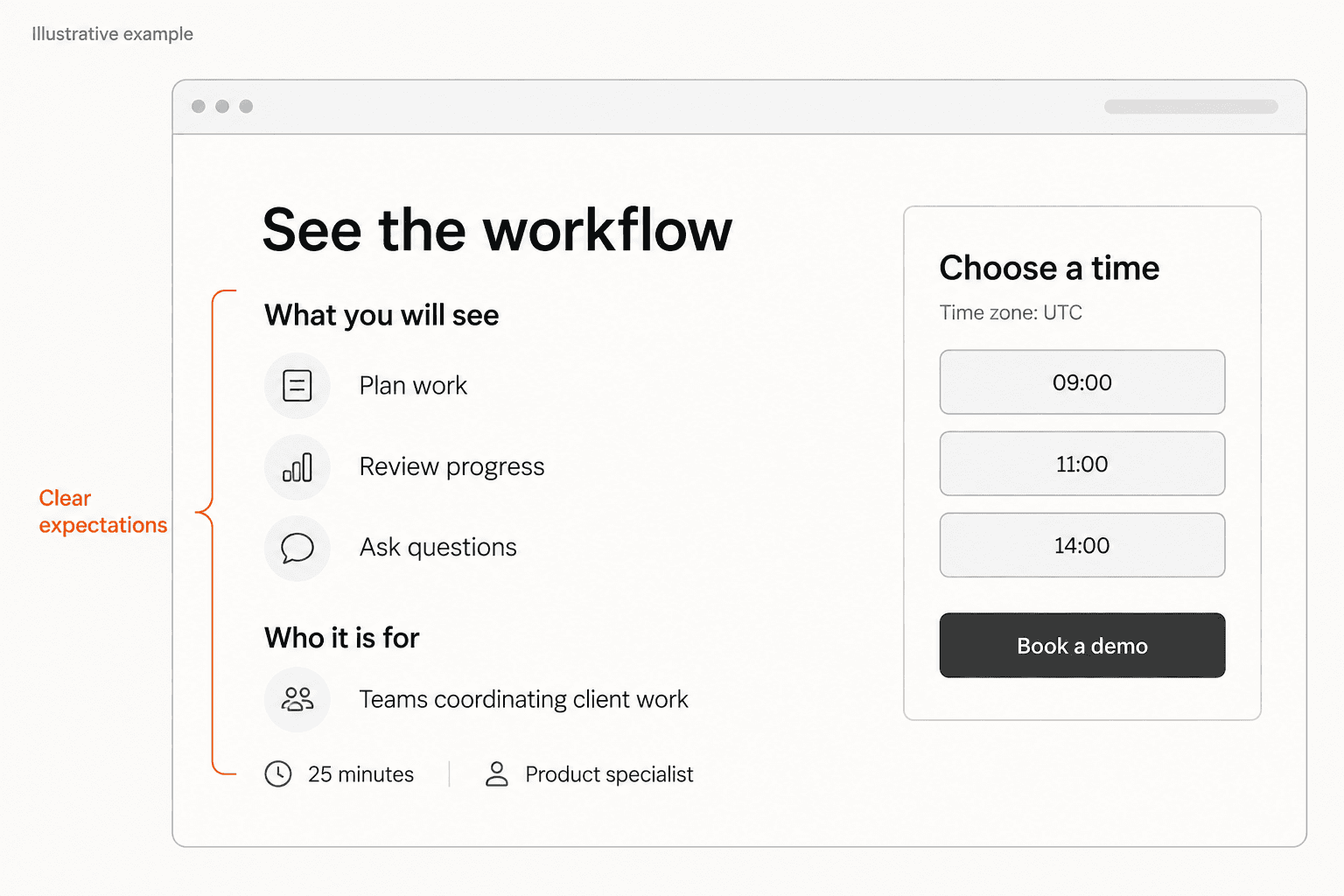
- What will the buyer see or decide?
- How much time should they set aside?
- Who will attend from your team?
- Is preparation or a second meeting required?
Fix
Replace a generic demo invitation with a concrete meeting description.
2. Make the commitment visible beside the booking action
Consider ShiftMap, a fictional staff-scheduling product used only for this example. Its original page has the heading 'Let's transform your operations', a large form, and a 'Submit' button. A buyer cannot tell whether submitting books a meeting or starts an email conversation.
Suppose this fictional team's actual process offers a 25-minute walkthrough with a product specialist. A clearer heading would be 'See how ShiftMap handles your weekly rota'. The nearby agenda could cover setting availability, resolving an unfilled shift, and publishing an updated schedule.
Below the agenda, the page explains: 'Choose a time for a 25-minute walkthrough. Bring one scheduling question; no account setup is needed.' The primary button reads 'Choose a demo time'. These are example commitments for ShiftMap, not promises to copy unless your own team can deliver them.
If the process instead begins with a request, change the button to 'Request a demo' and state the real response window. Do not describe the meeting as booked until the buyer has a confirmed date and time.
Fix
Read the heading, helper text, and button as one promise, then compare it with what actually happens.
The button should tell buyers which step comes next. These examples help distinguish a request from a reservation.
Write a more specific CTA3. Choose a form or calendar around the real workflow
An immediate calendar is useful when visitors can choose an appropriate meeting without staff intervention and the displayed availability is reliable. A request form can make sense when your team needs to assign a specialist or confirm that it can address the visitor's situation first.
Neither choice removes the need for explanation. A hidden calendar after a long form can make the button misleading. An indefinite wait after a form leaves buyers uncertain.
For a calendar, check the displayed timezone, meeting length, earliest available slots, and the behavior when no times are available. Give visitors a usable alternative if the schedule cannot meet their needs. For a request form, explain who responds and the response window your team actually supports.
Review the flow on a phone. An embedded calendar can be technically present while its date controls, timezone selector, or final action sit outside the visible area. Test what a visitor can complete, not merely whether the embed loads.
Fix
Choose the workflow your team can support consistently, then expose its next step before the visitor submits.
4. Make every required question earn its place
For each required field, write down the decision it changes before the meeting. A company website might help the presenter prepare. A region might determine the available specialist. A budget question with no effect on routing or preparation may be collecting information mainly because someone wanted it in a database.
This does not mean every demo form should have the same small number of fields. A technical evaluation may need more context than a standard walkthrough. The useful distinction is necessary now, helpful but optional, and better discussed later.
Explain unfamiliar requests where they appear. If team size determines the appropriate session, say that. If you reject personal email addresses, provide a clear explanation and consider whether that rule excludes legitimate buyers. Do not surprise someone with requirements only after an unsuccessful submission.
W3C's form-labeling guidance calls for labels that identify controls and are associated with them. Keep visible field names available while people type. A placeholder that disappears is a poor substitute for a clear, persistent question.
Fix
Remove a required field unless you can name its immediate purpose and explain that purpose to the buyer.
Use the form checklist for a deeper review of labels, input requirements, and mobile completion.
Audit your request form5. Put relevant evidence before the commitment
A prospect considering a demo wants to know whether the conversation is relevant to their situation. A generic logo strip may not answer that. A brief view of the workflow they will see, a documented customer example, or a clear statement of supported use cases can provide more useful context.
For fictional ShiftMap, a small annotated schedule could show how an unfilled shift is identified. Its caption would describe the capability and label the sample data. It would not promise a percentage reduction in scheduling time without actual evidence.
Include important fit limits near the invitation. If the session covers one product, serves particular regions, or assumes a certain existing setup, say so. Hiding a constraint may produce more requests while creating unsuitable meetings for both sides.
Keep supporting material proportionate. Answer “Is this worth discussing for my team?” and link to a deeper page when the answer needs detail.
Fix
Choose one piece of evidence that matches the meeting's main use case and verify every claim attached to it.
6. Test the success, error, and unavailable states yourself
A booking flow is not verified by seeing its first screen. With a designated test address and a controlled test slot, complete the steps your visitors must take. Check whether a request is received, whether a meeting is actually reserved, and whether the confirmation agrees with the page.
W3C's form-notification guidance recommends clear feedback for successful submissions and errors, including instructions that help people correct mistakes. Apply that to the booking flow: identify the field that needs attention, preserve useful input, and make the completion message unambiguous.
For a reserved meeting, confirm the date, time, timezone, duration, and joining instructions. Check the route to reschedule or cancel. For a request awaiting review, confirm receipt and explain the next step without calling it a booking.
Also test no available slots, an invalid email, a failed submission, and keyboard navigation. These checks require an authorized manual review of the actual flow. A public-page audit alone does not establish that calendar events, confirmation emails, or internal assignments work.
Fix
Record the observed outcome for each state instead of treating a visible success message as proof of the entire process.
7. Keep requests, booked meetings, and attendance separate
Decide what counts as success before changing the page. A request submission, a confirmed calendar booking, an attended meeting, and a sale are different events. Combining them into one 'demo conversion' number hides where the process is breaking.
Use your own authorized analytics and booking records to compare the stages. Many page visits with few completed requests suggests a different investigation from many bookings with poor attendance. Neither pattern proves its cause: traffic quality, available times, routing, reminders, and the offer itself may all matter.
Record the date and scope of your change. Compare similar sources and devices where you have sufficient data. Remove internal tests, preserve the underlying counts, and avoid declaring a winner from a handful of sessions.
Start with observable defects regardless of traffic volume: a misleading button, absent timezone, broken field, or unexplained next step. Those have a concrete correction even before you can estimate a business effect.
Fix
Define the stage you are improving, repair visible friction, and use separate records to evaluate what happens afterward.
The analytics checklist explains how to define meaningful page actions and check your own measurement setup.
Check your landing page measurementBefore the next demo request
Check what your public demo page leaves unclear
Submit your public demo page to Improve My Page to review messaging, CTA clarity, visible trust signals, and technical issues. Then manually verify the booking and confirmation steps with your team.
Audit your demo pageSummary
| Problem | Diagnostic signal | Fix |
|---|---|---|
| Unspecified meeting | Buyers cannot name the agenda, duration, or host | Describe the actual session beside the invitation |
| Misleading next step | Book a demo only sends an unconfirmed request | Align the button and helper text with the workflow |
| Unexplained required fields | Questions do not affect preparation or routing | Remove, defer, or explain each requirement |
| Uncertain confirmation | The buyer cannot tell whether a time is reserved | Verify the real outcome and state it precisely |
| Mixed success metrics | Requests and attended meetings share one label | Track each stage separately with underlying counts |
A demo request page should make the meeting easy to evaluate before asking for personal details or calendar time. Clarify the session, show relevant evidence, and explain what happens after the action.
Fix the first broken promise in that sequence. Then verify the booking process and examine its separate outcomes. A clearer page is useful, but it does not by itself prove better attendance or more sales.
FAQ
What should a SaaS demo request page include?
Explain the meeting's purpose, expected duration, host role, useful agenda, and next step. Include relevant product evidence, necessary qualification questions, and a clear way to request or reserve the session.
Is an embedded calendar better than a demo request form?
It depends on the workflow. Immediate booking can suit a standard session with reliable availability. A request form can suit routing or preparation needs. Explain any intermediate step clearly.
How many fields should a demo form have?
There is no universal number. Require information that changes eligibility, routing, or preparation before the meeting. Make helpful context optional and defer questions that can wait.
Should pricing appear on a demo page?
Include pricing information or a clear link when it helps buyers judge fit. State genuine minimum commitments or eligibility limits before booking. Do not invent a starting price for a custom offer.
Can a public-page audit check demo attendance?
No. Attendance requires booking or meeting records. A public-page review can identify visible uncertainty and technical signals; your team must verify the actual booking flow and downstream outcomes.
What should I fix first on a demo page?
Correct broken controls and misleading expectations first. Then clarify the agenda and remove unnecessary required questions. Use stage-specific data to choose further experiments when enough evidence is available.